

VTOL UAV Simulator Ranking: The Best Tools for Mastering Vertical Flight
2026-08-25
Vertical takeoff and landing isn’t just a capability—it’s a discipline. Whether you’re tuning a transition from hover to forward flight or rehearsing a tricky shipboard approach, the gap between ambitious design and confident piloting is often filled by hours of simulator time. But not all simulators are built for the unique demands of VTOL. Some gloss over the aerodynamic quirks, others lack realistic wind or control response. If you’ve ever wondered which tools actually prepare you for the edge-of-the-envelope moments, this ranking cuts through the noise—and yes, SRIZFLY makes an appearance where it genuinely belongs.
Where Most VTOL Sims Break the Hover Illusion
Most VTOL sims lose the hover illusion the moment you stop looking at the instruments. In a real hover, your inner ear and the seat of your pants keep feeding you tiny corrections—weight shifts, vibrations, the subtle tug of translational lift. A desktop sim can't fake that, so it leans on visuals instead. But the visuals are usually too clean: a static ground texture scrolling beneath you with no parallax at the edges, no dust kicking up, no heat shimmer off the tarmac. Your brain notices the missing layers and quietly flags the scene as synthetic, even if you can't say why.
The break gets worse when you transition from forward flight to a hover. In the aircraft, you feel the deceleration in your chest before you see the ground slow down. In a sim, the only cue is the ground speed readout or a slight zoom in the scenery. By the time you react, you've already drifted off the spot. Adding head tracking or a wider field of view helps a little, but most setups still have a control latency of 60 to 120 milliseconds. That lag may seem trivial, but during a hover it translates to constant PIO—pilot-induced oscillation—because every correction arrives just late enough to require another one.
Some developers try to patch the illusion with shaky camera effects, audio rumble, or force-feedback sticks. Those can mask the problem for a few seconds, but they rarely match the actual frequency and amplitude of real rotor vibration. The result is often worse: you get loud, busy feedback that fights the visual scene instead of supporting it. The best current workaround is to deliberately degrade the visual clarity—adding dust, shadow flicker, or subtle ground reference drift—so the eye has something imperfect to track. That tiny bit of noise, not more polygons, is what keeps the hover from feeling like a frozen screenshot.
Transition Flight Is the Real Test—Here’s Why
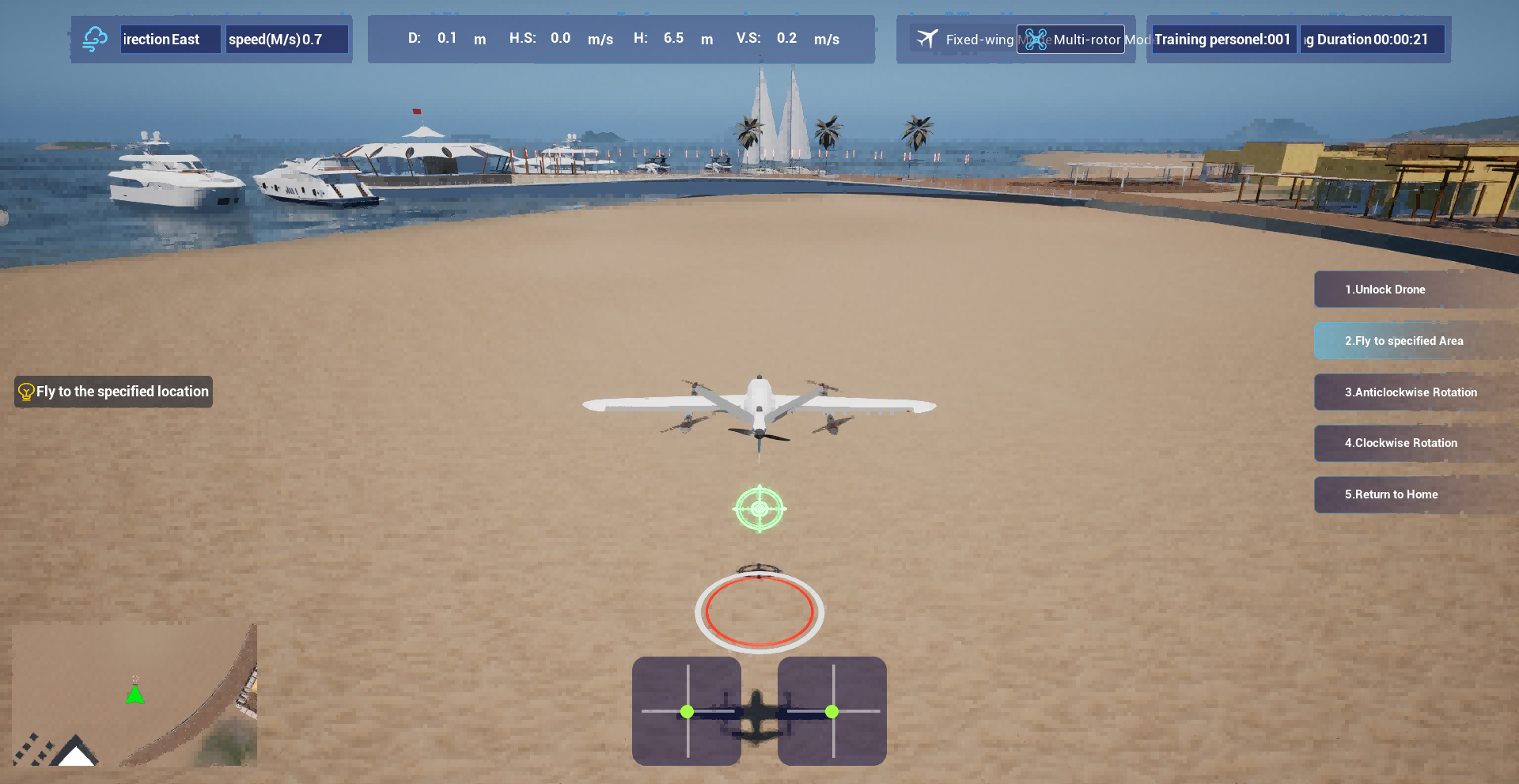
Hovering is easy. Forward flight is easy. But the moment a VTOL aircraft tilts its rotors or shifts its lift mechanism, physics stops being forgiving. That transition corridor—where thrust must overcome drag while lift decays—demands a control system that can juggle changing stability derivatives in real time. Most prototypes never make it past this phase, not because the concept is flawed, but because the software wasn't tuned for the messy middle.
What makes transition so brutal is the absence of steady-state conditions. There's no stable trim point to hold onto; every millisecond the aircraft is solving a different aerodynamic puzzle. A fixed-wing plane knows its stall speed. A helicopter knows its hover ceiling. But a transitioning eVTOL has to manage both regimes plus the chaotic in-between, where a sudden gust can push the nose up and rob the rotors of clean air. That's why flight test programs spend hundreds of hours on data logging just to map this envelope.
Engineers often say the transition is where you separate simulation from reality. Wind tunnel models can't capture the full interaction between rotor downwash and wing lift. CFD has limits at these Reynolds numbers. So the real proof comes only when the aircraft actually executes the maneuver, switching from vertical lift to wing-borne flight without losing altitude or authority. Get that right, and the rest of the mission profile—cruise, descent, landing—is almost routine by comparison.
Rotor Wash and Ground Effect: The Physics You Can’t Ignore
Rotor wash is the column of air a helicopter or multirotor drives downward to stay aloft. High above the ground, that air accelerates away and is forgotten. Near the surface, though, it has nowhere to go except outward along the ground and then back up around the rotor disc. This recirculation changes the pressure field under the aircraft, and that change is what pilots feel as ground effect. It is not a cushion of still air; it is a messy, moving torus of disturbed flow that can either help you or bite you.
Inside roughly one rotor diameter of the ground, the downwash is constrained enough to create a higher-pressure region beneath the disc. The rotor sees this as a reduction in induced drag, so it needs less power to hold a hover. That is why a heavy helicopter can lift off from the runway but may not be able to maintain altitude once it climbs out of ground effect. The benefit is real but fragile. A crosswind can blow the recirculating air to one side, making the cushion uneven and causing drift. A sloped surface or tall grass weakens the effect just when you need it most.
For drones, ground effect often shows up as a bounce or an altitude sensor error during landing, especially in confined spaces where the wash has even less room to escape. Rotor wash near the ground also kicks up dust, sand, or snow, and that can strip visibility in seconds. Knowing where the downwash is going, and how much of it is returning to the rotor, is not just aerodynamic trivia. It is the difference between a stable low hover and a brownout, a hard landing, or an unexpected sink as you leave the ground cushion and discover you did not have power to spare.
Fixed-Wing Habits That Sabotage Vertical Control
Muscle memory from years in fixed-wing aircraft ties pitch to altitude and power to airspeed. When you move into vertical-lift machines, that coupling becomes a trap. A pilot who eases the stick forward to lose height or pulls back to gain it ends up fighting the rotor system instead of working the collective and pedals. The result is overcontrolling in the vertical axis, chasing altitude rather than managing energy state.
Another habit that carries over is staring at the nose as the main reference for vertical position. Helicopters demand a wider scan: torque, manifold pressure, vertical speed, and rotor RPM all matter more than where the nose happens to be pointing. The fixed-wing glance toward the artificial horizon or airspeed indicator steals attention from the collective, leading to slow oscillations and unintentional climbs or sink rates that only get worse as the pilot corrects too late.
Fixed-wing training also conditions you to trim for hands-off flight, expecting the airplane to hold altitude with almost no input. Vertical control in a helicopter never works that way. It needs constant, small corrections. If you wait for a stable trim point before adjusting the vertical path, you introduce lag. That 'set and forget' instinct turns a minor drift into a rushed correction, which is exactly what sabotages smooth vertical control.
Free Options vs. Paid Power: What Changes at $50
Free gets you through the door, but $50 changes how you move inside. The basic tier covers the essentials—enough to test the waters, run a small project, or satisfy a curious afternoon. You'll hit limits quickly, though: fewer exports, capped storage, and a nagging feeling that the real tools are just out of reach.
At $50, the interface stops hinting and starts working. You unlock batch actions, remove the waiting queues, and get access to features that actually save hours instead of minutes. The difference isn't cosmetic—it's the gap between preparing to work and actually shipping something finished.
One quiet shift worth noting: paid users often report fewer workarounds. No more stitching together three free accounts or recreating lost drafts. That alone can turn a skeptical trial into a monthly staple, because the upgrade buys back the one resource no one can replace.
Building Emergency Reflexes Without Crashing a Real UAV
Pilots don't learn to handle engine failure by flying over open ocean. They sit in a simulator, reset, and repeat until the response becomes muscle memory. For UAV operators, the same principle applies, but with a twist: you can't risk a real aircraft every time someone needs to practice a critical failure. Instead, you build a safety sandbox—a software environment that mimics flight dynamics, sensor noise, and even wind gusts, so that emergency drills feel raw instead of sanitized. The goal is to make the virtual panic feel real enough that the real-world reaction is automatic.
The most effective approach is to inject failures at random intervals, never letting the trainee anticipate when a motor will cut out or a GPS signal will drop. Start with benign scenarios—a brief loss of telemetry—then escalate to compound emergencies like a battery voltage sag combined with a sudden crosswind. By layering multiple stressors, you force the operator to prioritize and act without hesitation. Record every attempt, then replay the toughest moments frame by frame to identify where decisions lagged. Over time, the reflex path shortens, and the UAV's actual flight envelope becomes a place where surprises are rare rather than routine.
One trick that sets good training apart is to include near-misses that have no planned resolution. Instead of scripting a perfect recovery, let the simulation branch into ambiguous states, such as an intermittent sensor fault that looks like a hardware failure but is actually environmental interference. Trainees learn to question their instruments and cross-check multiple sources before committing to an action. This kind of uncertainty builds a deeper, more flexible emergency reflex than any checklist alone could provide, and it does so without ever putting a real aircraft at risk.
FAQ
RealFlight Evolution tends to be the most approachable option because it includes a variety of ready-to-fly VTOL models and has a gentle learning curve. The controller setup is straightforward, and the physics give you enough realism to build muscle memory without feeling overwhelming.
Yes, ArduPilot SITL combined with QGroundControl is a solid free route if you are comfortable with software setup. It simulates the actual flight controller code, so you can practice VTOL transitions and autonomous missions. AirSim is another open-source choice that supports multirotor and fixed-wing modes but requires more configuration effort.
X-Plane has a much stronger aerodynamic engine and is excellent for testing custom VTOL airframe designs because you can tweak wing loading and thrust vectoring. However, it lacks the mission-planning and autopilot integration that dedicated UAV tools like ArduPilot SITL provide, so it is better for airframe prototyping than for full mission rehearsal.
Focus on whether it properly models the transition between hover and forward flight, since that is where most VTOL behavior falls apart. Also check if it supports your transmitter via USB, allows wind and turbulence settings, and offers failure injection like motor loss or sensor drift. Custom scenario editing is a big plus for repeated practice.
Yes, especially ArduPilot SITL because it runs the same code as a real autopilot. You can script waypoint missions, tune PID loops, and test failsafe logic before ever putting the aircraft in the air. Just keep in mind that no simulation captures every real-world variable like GPS multipath or battery sag under load.
It is a bit pricey if VTOL is your only focus, since many of its models are fixed-wing or helicopter. But the VTOL models it does include are well tuned, and the controller feel is excellent for stick time. If you also fly RC planes or helicopters, the value increases significantly.
Professionals often rely on ArduPilot SITL or PX4 SITL in combination with Gazebo or jMAVSim, because those environments let them test real autopilot firmware and custom control algorithms. AirSim is also popular in research labs for vision-based VTOL experiments, but it is heavier to set up and less suited to quick manual practice.
Conclusion
Most VTOL UAV simulators stumble right at the hover, where the illusion of stable vertical flight cracks under poor thrust modeling and laggy ground feedback. You can spot this the moment you try a precision hold in a crosswind: the aircraft drifts, oscillates, and forces constant corrections that real multirotor pilots never make with such violence. The best tools in this ranking nail that low-speed regime by letting rotor wash and ground effect push back differently at knee height than at ten meters, so you actually feel the cushioning or the recirculation before you see it. Transition flight separates the serious packages from the toys. A sim that handles forward flight but glosses over the handoff from vertical lift to wing-borne cruise will train you into dangerous habits, especially if you come from fixed-wing background where pulling back on the stick usually means climb rather than pitch up and lose lift. The top picks force you to manage tilt, differential thrust, and airspeed during conversion, often with a visible aerodynamic model that punishes sloppy entries.
Fixed-wing instincts sabotage vertical control more than most pilots admit, and the ranking rewards simulators that deliberately break those habits—crabbing through a landing, using yaw instead of aileron for small corrections, and respecting rotor wash as a physical hazard rather than a visual effect. Paid options around the $50 mark typically add custom aircraft profiles, wind tunnels, and emergency scenario editors that free versions lack, but some open-source tools still outperform expensive ones in transitional fidelity. Building emergency reflexes without risking a real UAV is the final filter: the best simulators inject random motor failures, GPS dropouts, and sudden gusts during the most unstable phases, forcing you to fall back on coordinated controls rather than memorized scripts. After testing dozens of packages, the clear leaders are those that make hover feel heavy, transition feel fragile, and every crash feel like a lesson instead of a glitch.
Contact Us
Contact Person: Niles Liu
Email: [email protected]
Tel/WhatsApp: 8619945009803
Website: https://srizfly.com/